📄 Introduction
What works perfectly during development doesn’t always work for real users.
The same application supports both SQLite and PostgreSQL — without changing the core code.
In the Login implementation of the Teacher Assistant application, built in Rust, PostgreSQL was initially used for authentication and data management, providing structure, reliability, and scalability as the application evolved.
However, the application’s users have different requirements. While institutions can benefit from a full database server, an individual teacher often needs a lightweight solution that runs without installation overhead or configuration complexity.
Relying on a single database setup introduces friction in such cases. Setting up and maintaining a database server is not always practical for single-user scenarios.
This leads to a deeper design question:
How can a single Rust application support both a lightweight, standalone mode and a scalable, multi-user setup — without duplicating logic or complicating the codebase?
Addressing this required redesigning the data layer with flexibility as a core requirement.
🧠 Adapting the Data Layer for Different Use Cases
Supporting both usage patterns required rethinking the structure of the data layer.
Instead of relying on a single database system, the application was extended to support two database options:
SQLite for standalone usage — a lightweight, file-based solution that runs without additional setup. PostgreSQL for organizational environments — where scalability and multi-user access are essential.
This approach allows the same application to operate in two distinct modes, depending on the context, without altering the overall feature set.
However, introducing multiple databases brings its own complexity. Each system has differences in connection handling, query syntax, and behavior. Managing these separately would increase complexity and lead to duplicated logic.
To keep the implementation consistent, the focus shifted toward unifying database interaction behind a single interface — allowing the application to switch between SQLite and PostgreSQL without affecting the core logic.
This is where a database-agnostic connection layer becomes essential — forming the foundation for a unified implementation that works seamlessly across both systems.
🔗 Unifying Database Access with a Single Connection Layer
Supporting both SQLite and PostgreSQL requires more than switching connection strings. Each database typically has its own connection pool and API, which can lead to duplicated logic if handled separately.
To avoid this, the application uses AnyPool from sqlx, a database-agnostic connection pool that allows the same code to work across different database systems.
Instead of using database-specific pools such as PgPool (PostgreSQL) or SqlitePool (SQLite), the application relies on a single AnyPool to avoid maintaining separate implementations for each database. This removes the need for branching logic and keeps the data access layer consistent.
// crates in Cargo.toml
sqlx = { version = "0.7", features = ["runtime-tokio-native-tls", "any", "postgres", "sqlite"] }
dirs = "5.0"

//db.rs
use sqlx::{AnyPool, Row};

#[derive(Clone)]
pub struct Database {
    pub pool: AnyPool,
}

impl Database {
    pub async fn new(url: &str) -> Result<Self, sqlx::Error> {
        let pool = AnyPool::connect(url).await?;
        Ok(Self { pool })
    }
}
Explanation:
| Code Line/Section | What It Does | Why It Matters |
|---|---|---|
sqlx features: "any", "postgres", "sqlite" |
Enables multiple database backends | Required for runtime database switching |
AnyPool |
Generic connection pool | Works with both SQLite and PostgreSQL |
Database struct |
Wraps the pool | Central access point for DB operations |
#[derive(Clone)] |
Enables struct cloning | Allows safe sharing of the pool across UI and async tasks |
AnyPool::connect(url) |
Establishes connection | Determines database type from URL |
url input |
Runtime configuration | Controls whether SQLite or Postgres is used |
The database is selected through the connection URL, not through conditional code paths. This allows the same code to operate across different databases without modification.
With this unified connection layer in place, the application can initialize the database dynamically and execute queries without introducing database-specific logic into the codebase.
The following sections show how this abstraction is applied in practice — starting with application initialization in main.rs, followed by schema setup and database handling in db.rs.
🧱 Application Initialization and Runtime Flow (main.rs)
This file initializes the runtime, resolves the database configuration, establishes the connection, prepares the schema when required, and launches the application UI.
//main.rs
mod db;
mod app;

use db::Database;
use dotenvy::dotenv;
use std::env;

#[tokio::main]
async fn main() -> anyhow::Result<()> {
    sqlx::any::install_default_drivers();

    dotenv().ok();

    // Read database URL from .env
    let database_url = env::var("DATABASE_URL")
        .unwrap_or_else(|_| {
            // Get local app data folder
            let mut path = dirs::data_local_dir()
                .expect("Cannot find local data directory");

            path.push("TeacherAssistant");

            // Create directory if it doesn't exist
            std::fs::create_dir_all(&path)
                .expect("Failed to create app directory");

            path.push("teacher_assistant.db");

            let path_str = path.to_string_lossy().replace("\\", "/");

            format!("sqlite:///{}?mode=rwc", path_str)
        });

    println!("Connecting to: {}", database_url);

    let db = Database::new(&database_url)
        .await
        .expect("Failed to connect to database");

    println!("Database connected successfully");

    // If using SQLite → initialize schema
    let is_sqlite = database_url.contains("sqlite");
    if is_sqlite{
        db.init_sqlite_schema().await?;
        println!("SQLite schema initialized");
    }
    let native_options = eframe::NativeOptions::default();

    let _ = eframe::run_native(
        "Teacher Assistant App",
        native_options,
        Box::new(move |_cc| Box::new(app::TeacherApp::new(db, is_sqlite))),
    );

    Ok(())
}
Explanation:
| Code Line/Section | What It Does | Why It Matters |
|---|---|---|
install_default_drivers() |
Registers SQLx drivers | Enables support for multiple databases via AnyPool |
dotenv().ok() |
Loads .env file |
Allows external configuration of database |
env::var("DATABASE_URL") |
Reads database URL | Enables runtime database selection |
unwrap_or_else(...) |
Fallback to SQLite | Ensures app runs without manual setup |
dirs::data_local_dir() |
Gets OS-specific directory | Stores DB safely in user environment |
create_dir_all() |
Creates folder if missing | Prevents runtime errors |
format!("sqlite:///...") |
Builds SQLite URL | Enables file-based DB creation |
Database::new(...) |
Initializes DB connection | Uses unified AnyPool layer |
contains("sqlite") |
Detects database type from URL scheme | Enables conditional schema setup |
init_sqlite_schema() |
Creates tables | Required for SQLite initialization |
run_native(...) |
Launches UI | Starts egui application |
Key Concepts
1️⃣ Runtime Database Selection
env::var("DATABASE_URL")
The database is selected at runtime through configuration:
- If set → uses configured database (e.g., PostgreSQL)
- If not set → falls back to SQLite
2️⃣ Automatic SQLite Initialization
if is_sqlite {
    db.init_sqlite_schema().await?;
}
SQLite requires schema creation at runtime, whereas PostgreSQL schemas are typically managed externally.
3️⃣ OS-Aware Local Storage
dirs::data_local_dir()
Retrieves the operating system’s standard local data directory, ensuring that the SQLite database is stored in an appropriate, user-specific location instead of a hardcoded path.
This approach allows the application to run with zero configuration for standalone use, while still supporting production-grade database setups.
🧱 Schema Initialization and Database Setup (db.rs)
With the runtime initialization in place, the next step is preparing the database for standalone usage.
This file defines the required tables and ensures that essential data is created when the application runs in SQLite mode.
This initialization is triggered only for SQLite, as PostgreSQL schemas are typically managed externally.
//db.rs
use argon2::password_hash::{PasswordHash, SaltString};

impl Database {
   //Intialize SQLite Schema
    pub async fn init_sqlite_schema(&self) -> Result<(), sqlx::Error> {

        sqlx::query(
            r#"
            CREATE TABLE IF NOT EXISTS classes (
                class_id INTEGER PRIMARY KEY AUTOINCREMENT,
                class_name TEXT NOT NULL,
                section TEXT NOT NULL,
                teacher_id INTEGER
            );
            "#
        )
        .execute(&self.pool)
        .await?;

        sqlx::query(
            r#"
            CREATE TABLE IF NOT EXISTS students (
                student_id INTEGER PRIMARY KEY AUTOINCREMENT,
                roll_no TEXT NOT NULL UNIQUE,
                student_name TEXT NOT NULL,
                class_id INTEGER,
                parent_contact TEXT,
                parent_email TEXT,
                FOREIGN KEY (class_id) REFERENCES classes(class_id),
                UNIQUE(class_id, roll_no)
            );
            "#
        )
        .execute(&self.pool)
        .await?;

        sqlx::query(
            r#"
            CREATE TABLE IF NOT EXISTS teachers (
                teacher_id INTEGER PRIMARY KEY AUTOINCREMENT,
                staff_id TEXT NOT NULL UNIQUE,
                staff_name TEXT NOT NULL,
                qualification TEXT,
                subjects TEXT,
                contact TEXT,
                email TEXT,
                role TEXT DEFAULT 'teacher'
            );
            "#
        )
        .execute(&self.pool)
        .await?;

        sqlx::query(
            r#"
            CREATE TABLE IF NOT EXISTS login (
                login_id INTEGER PRIMARY KEY AUTOINCREMENT,
                teacher_id INTEGER,
                username TEXT NOT NULL UNIQUE,
                password_hash TEXT NOT NULL,
                FOREIGN KEY (teacher_id) REFERENCES teachers(teacher_id)
            );
            "#
        )
        .execute(&self.pool)
        .await?;

        let salt = SaltString::generate(&mut OsRng);

        let password_hash = Argon2::default()
            .hash_password("admin".as_bytes(), &salt)
            .unwrap()
            .to_string();

        sqlx::query(
            r#"
            INSERT INTO teachers (staff_id, staff_name, role)
            VALUES ('ADMIN', 'Administrator', 'admin')
            ON CONFLICT(staff_id) DO NOTHING
            "#
        )
        .execute(&self.pool)
        .await?;

        sqlx::query(
            r#"
            INSERT INTO login (teacher_id, username, password_hash)
            SELECT teacher_id, 'ADMIN' , ?
            FROM teachers
            WHERE staff_id = 'ADMIN'
            AND NOT EXISTS (
                SELECT 1 FROM login WHERE teacher_id = teachers.teacher_id
            )
            "#
        )
        .bind(password_hash)
        .execute(&self.pool)
        .await?;

        Ok(())
    }
}
Explanation:
| Code Line | What It Does | Why It Matters |
|---|---|---|
CREATE TABLE IF NOT EXISTS |
Creates tables safely | Prevents duplicate creation |
classes table |
Stores class and section | Base academic structure |
students table |
Stores student details | Includes parent contact and email |
teachers table |
Stores teacher data | Includes role information |
login table |
Stores login credentials | Linked via foreign key |
FOREIGN KEY |
Maintains relationships | Ensures data consistency |
UNIQUE constraints |
Prevent duplicate entries | Enforces data integrity |
SaltString::generate() |
Generates salt | Required for secure hashing |
Argon2::hash_password() |
Hashes password | Prevents storing plain text |
INSERT ... ON CONFLICT |
Adds admin safely | Avoids duplicate entries |
INSERT INTO login ... SELECT |
Links admin login | Ensures valid relationship |
Key Concepts
1️⃣ Idempotent Schema Creation
CREATE TABLE IF NOT EXISTS
Schema creation can be safely executed multiple times without affecting existing data.
2️⃣ Secure Default Credentials
Argon2::default().hash_password(...)
Passwords are stored as hashes instead of plain text, ensuring secure authentication.
3️⃣ Controlled Initialization
ON CONFLICT DO NOTHING
Prevents duplicate admin creation while ensuring required baseline data is always present.
This ensures that a fresh SQLite setup is immediately usable without manual database preparation.
⚙️ Runtime Database Selection
The application does not hardcode the database type and instead determines it at runtime based on configuration.
- If a DATABASE_URL is provided (for example, a PostgreSQL connection string), it connects to PostgreSQL.
- If no configuration is provided, it automatically falls back to SQLite by creating a local database file.
This approach allows the same codebase to adapt to different environments without requiring any changes.
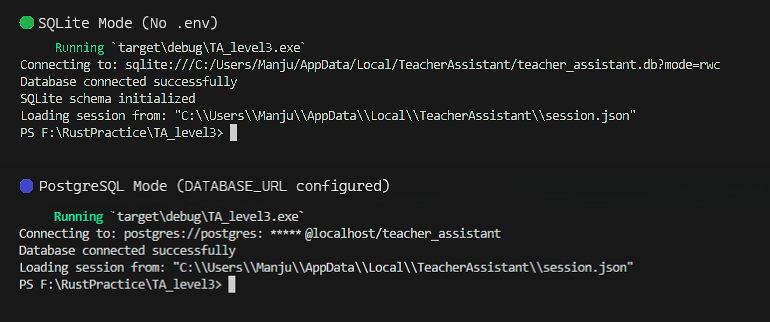
🔄 Runtime Database Switching in Action
The application dynamically selects the database at runtime based on configuration.
As shown below, the same application connects to SQLite without .env and switches to PostgreSQL when DATABASE_URL is provided.
Click the image to view full size
⚖️ Key Differences Between SQLite and PostgreSQL in This Application
Supporting both SQLite and PostgreSQL introduces important differences at the database level. While the application uses a unified connection layer, certain behaviors still vary between the two systems — particularly in configuration, query syntax, and initialization.
The following table highlights the key differences relevant to this implementation:
| Aspect | SQLite | PostgreSQL |
|---|---|---|
| Setup | No setup required | Requires database server |
| Environment dependency | None | Requires running DB service |
| Performance | Best for single-user workloads | Optimized for concurrent access |
| Configuration | Works without .env |
Requires DATABASE_URL in .env |
| Storage | File-based (.db file) |
Server-based |
| Connection URL | sqlite:///path/to/db |
postgres://user:pass@host/db |
| Query placeholders | ? |
$1, $2, … |
| Schema creation | Done at runtime | Usually pre-configured |
| Use case | Single-user (teacher) | Multi-user (organization) |
Despite these differences, the core application logic remains unchanged due to the unified connection layer.
⚠️ Challenges Faced While Supporting Multiple Databases
Supporting both SQLite and PostgreSQL through a single codebase introduced a set of practical challenges. While the overall architecture remained consistent, differences between the two systems became noticeable during implementation.
1️⃣ Query Parameter Syntax → SQLite uses ? as a placeholder, whereas PostgreSQL expects numbered placeholders such as $1, $2, and so on. Queries written for one database would fail when executed against the other. This required careful handling of queries and avoiding assumptions tied to a single database syntax.
2️⃣ Database Initialization → SQLite creates a database file automatically if it does not exist, but it does not create tables unless explicitly defined. This led to runtime errors when queries were executed before the schema was initialized. This was addressed by introducing a conditional schema setup step that runs only when SQLite is detected.
3️⃣ Configuration Differences → PostgreSQL requires a valid connection string provided through a .env file, whereas SQLite can operate without external configuration. Missing or incorrect environment variables resulted in connection failures for PostgreSQL, while SQLite continued to work due to the fallback mechanism. This was handled by validating configuration early and ensuring a reliable fallback path.
4️⃣ Default Data Initialization → Repeated application runs initially resulted in duplicate admin entries when inserting default data. This was resolved using conflict-handling queries such as ON CONFLICT DO NOTHING, along with conditional inserts to ensure idempotent behavior.
5️⃣ Constraint Consistency → Differences in how constraints are enforced across SQLite and PostgreSQL required explicit definitions for foreign keys and uniqueness. Relying on implicit behavior caused inconsistencies, which were resolved by clearly defining constraints within the schema to ensure consistent behavior across both systems.
Addressing these differences ensured that the application behaves consistently across both environments while keeping the core application logic fully database-agnostic.
🔍 Design Insights
- A well-designed data layer matters more than the database choice itself.
- Runtime configuration enables flexibility without adding complexity.
- Supporting multiple databases introduces subtle differences that must be handled deliberately.
- Abstraction simplifies the architecture, but consistency still requires careful implementation.
- Designing for flexibility early helps prevent complexity as the application evolves.
📜 Conclusion
Supporting both SQLite and PostgreSQL required more than adding another database option. It meant structuring the data layer to remain consistent across different environments while keeping the implementation simple and maintainable.
By introducing a unified connection layer, the application can now adapt to both standalone and multi-user scenarios without changing the core logic. This enables a single codebase to serve different use cases without introducing additional complexity.
With this foundation in place, the application is now positioned to support more advanced features built on top of it.
The next steps focus on extending this system with real-world functionality while continuing to refine its architecture.
Follow the progress on Techn0tz for upcoming updates.