📄 Introduction
A login system is only the entry point. What follows after authentication defines how the system behaves, what data becomes visible, and which actions are allowed.
In the previous post, Building Login System in Rust — egui + PostgreSQL, the Teacher Assistant application’s authentication system was implemented using Rust, egui, and PostgreSQL. That phase established the foundation for verifying user identity and controlling access to the application.
However, authentication alone does not define how the application operates. Once a user logs in, the interface and available actions must adapt based on their role. An administrator requires broader control over teachers, students, and system data, while teachers must be limited to their assigned classes and permitted student information.
This phase focused on designing and implementing a role-aware dashboard and a student management system fully integrated with PostgreSQL. The objective was not simply to display database records, but to build a structured, state-driven interface where navigation, actions, and data visibility dynamically respond to the authenticated user’s role.
This implementation includes:
- Designing a dashboard with role-aware navigation
- Implementing student CRUD operations backed by PostgreSQL
- Restricting actions based on user roles (Admin vs Teacher)
- Filtering student data based on class assignments
- Structuring egui UI rendering using a clean, state-driven architecture
This marks an important transition in the Teacher Assistant application — from a system that verifies identity to one that actively manages academic data based on roles and permissions.
🛡️ Role-Based Authorization and Dashboard Integration (Admin vs Teacher)
Authentication confirmed who entered the system. Authorization defined what they were allowed to do after entering.
Once the login process was connected to PostgreSQL, the next step was extending it to return not only the teacher’s identity, but also their assigned role. This made it possible to distinguish administrators from teachers at the application state level, enabling role-aware behavior across the dashboard and student management panels.
The login verification function was updated to retrieve both the teacher_id and the associated role from the database:
pub async fn verify_login(
        &self,
        staff_id: &str,
        password: &str,
    ) -> anyhow::Result<Option<(i32, String)>> {

        let row = sqlx::query!(
            r#"
            SELECT t.teacher_id,
                t.role,
                l.password_hash
            FROM teachers t
            JOIN login l ON t.teacher_id = l.teacher_id
            WHERE t.staff_id = $1
            "#,
            staff_id
        )
        .fetch_optional(&self.pool)
        .await?;

        -----
	    //password verification code omitted
	    -----

        if verification {
            Ok(Some((record.teacher_id, record.role.unwrap_or("teacher".to_string()))))
        } else {
        Ok(None)
        }
    }
This allowed role information to be stored directly in the main application state:
pub struct TeacherApp {
    pub db: Database,
    pub logged_in_teacher: Option<i32>,
    pub user_role: Option<String>,

    //additional state omitted
}
In the update loop, once login verification succeeded, both identity and role were recorded, and role-dependent data such as assigned classes was prepared for loading:
match result {
    Ok(Some((teacher_id, role))) => {
        self.logged_in_teacher = Some(teacher_id);
        self.user_role = Some(role.clone());
        println!("Logged in role = {:?}", self.user_role);
        self.load_classes_pending = true;
        self.login_error = None;
        self.active_tab = DashboardTab::Dashboard;
    }
    Ok(None) => {
        self.login_error = Some("Invalid Staff ID or Password".to_string());
    }
}
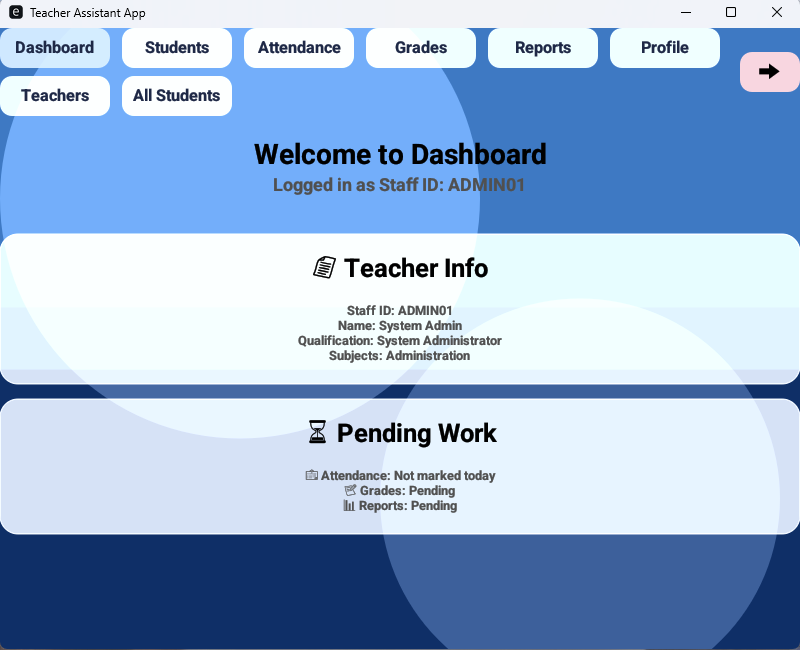
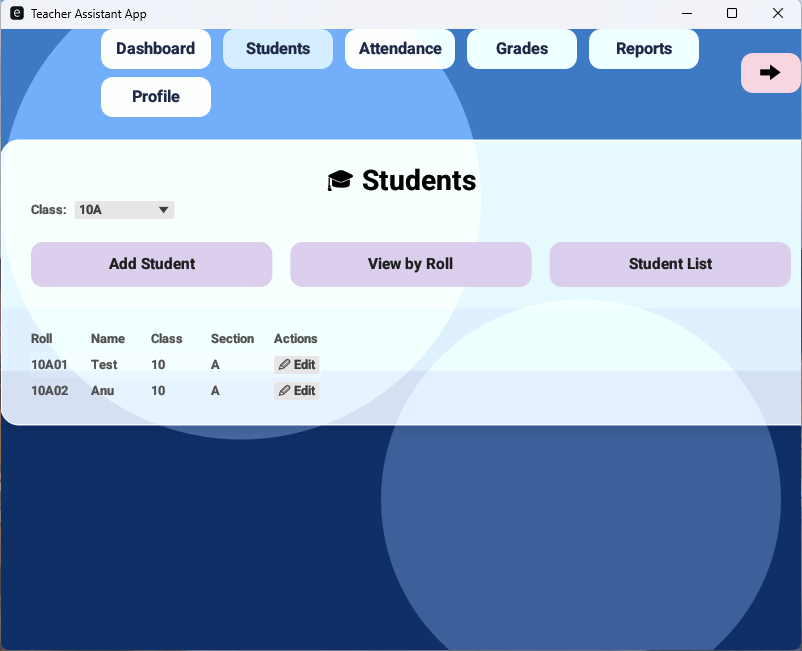
With role information available in the application state, the interface could adapt accordingly. Navigation tabs and permitted actions were rendered conditionally, ensuring administrators had broader access while teachers remained within their assigned scope:
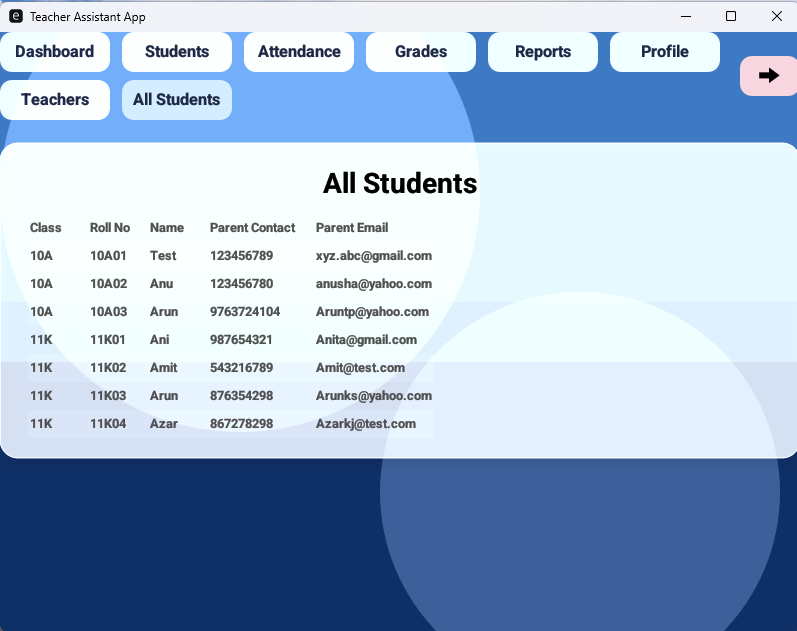
let tabs: Vec<(DashboardTab, &str)> = if is_admin {
    vec![
        (DashboardTab::Dashboard, "Dashboard"),
        (DashboardTab::Students, "Students"),
        (DashboardTab::Teachers, "Teachers"),
        (DashboardTab::AllStudents, "All Students"),
    ]
} else {
    vec![
        (DashboardTab::Dashboard, "Dashboard"),
        (DashboardTab::Students, "Students"),
    ]
};
This approach ensured that authorization was not handled through scattered conditional checks, but through a centralized, state-driven design. Once the role was established during login, the rest of the system responded naturally—controlling navigation, data visibility, and permitted actions through application state.
Authorization was no longer an isolated extension of login. It became a structural part of how the system operated.
🧭 Dashboard Panel Architecture and State Integration
At this stage, the Dashboard panel UI design is still under active development, and the code snippets shown here focus on the core logic of the panel.
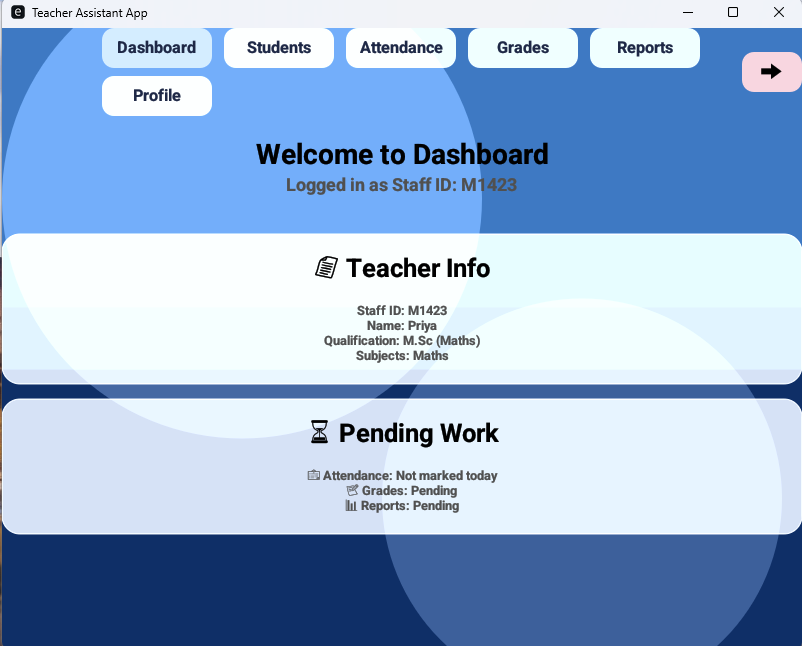
With role information available in the application state, the dashboard became the first interface responsible for reflecting user-specific data. Instead of displaying static placeholders, it needed to retrieve and present teacher information directly from PostgreSQL, ensuring the interface represented the authenticated user.
To support this, the application state was extended to store teacher information and manage its loading lifecycle:
pub struct TeacherApp {
    pub active_tab: DashboardTab,
    pub teacher_info: Option<Teacher>,
    pub load_teacher_info_pending: bool,

    // other state fields omitted
}
Once login verification succeeded, the system triggered a database request to retrieve teacher details. This was handled through a deferred loading flag, allowing the dashboard to request data without interrupting the UI rendering flow:
if self.load_teacher_info_pending {
    self.load_teacher_info_pending = false;

    if let Some(teacher_id) = self.logged_in_teacher {
        let db = self.db.clone();

        if let Ok(info) = pollster::block_on(async {
            db.get_teacher_info(teacher_id).await
        }) {
            self.teacher_info = Some(info);
        }
    }
}
The database layer retrieved the relevant teacher fields, ensuring that the dashboard state remained synchronized with PostgreSQL:
pub async fn get_teacher_info(
    &self,
    teacher_id: i32,
) -> Result<Teacher, sqlx::Error> {

    let row = sqlx::query!(
        r#"
        SELECT staff_name, qualification, subjects, contact, email
        FROM teachers
        WHERE teacher_id = $1
        "#,
        teacher_id
    )
    .fetch_one(&self.pool)
    .await?;

    Ok(Teacher {
        staff_name: row.staff_name,
        qualification: row.qualification,
        subjects: row.subjects,
        contact: row.contact,
        email: row.email,
    })
}
With teacher information available in state, the dashboard UI could render dynamically, ensuring the displayed data accurately reflected the authenticated user:
ui.heading(egui::RichText::new("📄 Teacher Info").size(26.0).strong(),);
ui.add_space(20.0);

if let Some(info) = &self.teacher_info {
    ui.label(format!("Staff ID: {}", self.username));
    ui.label(format!("Name: {}", info.staff_name));
    ui.label(format!("Qualification: {}",
        info.qualification.as_deref().unwrap_or("-")
    ));
    ui.label(format!("Subjects: {}",
        info.subjects.as_deref().unwrap_or("-")
    ));
}
In addition to displaying teacher information, the dashboard also served as the primary navigation controller. The top navigation tabs, derived from the authenticated user’s role as described in the previous section, allowed switching between panels by updating the active tab state:
for (tab, label) in tabs {
    let active = self.active_tab == tab;

    if ui.add(button).clicked() {
        self.active_tab = tab;

        if tab == DashboardTab::AllStudents {
            self.load_all_students_pending = true;
        }
    }
}
Because navigation was driven entirely by application state, the interface remained consistent and predictable. Each tab selection updated the active state, and the corresponding panel responded accordingly without duplicating navigation logic or authorization checks.
The dashboard thus served two interconnected roles: presenting authenticated user information and acting as the structural entry point for navigating the system. By linking database retrieval, application state, and UI rendering, it ensured that both identity and navigation remained synchronized throughout the user session.
While the dashboard reflected authenticated identity, the students panel extended this model by enabling structured interaction with academic records stored in PostgreSQL.
🎓 Students Panel and Database-Backed CRUD Operations
With authentication and dashboard navigation in place, the next step was introducing a structured students panel capable of loading, displaying, and managing student records directly from PostgreSQL. This panel needed to support multiple classes, enforce role-based permissions, and maintain synchronization between the database and application state.
To support class-based filtering and student management operations, the application state was extended to store assigned classes, selected class context, and pending database operations:
pub struct TeacherApp {
    pub add_student_pending: bool,
    pub delete_student_pending: Option<i32>,
    pub update_student_pending: Option<i32>,
    pub classes: Vec<Class>,
    pub selected_class_id: Option<i32>,
    pub students: Vec<Student>,
    pub load_students_pending: bool,
    pub classes: Vec<Class>,
    pub selected_class_id: Option<i32>,
    pub load_classes_pending: bool,

    // additional state omitted
}
To manage different interaction states—such as viewing the student list, adding new records, or editing existing entries—the panel used a structured view state model. This allowed the interface to transition between operations without duplicating layout or rendering logic:
#[derive(Debug, PartialEq)]
enum StudentViewMode {
    List,
    Add,
    Edit(i32),
    ViewByRoll,
}
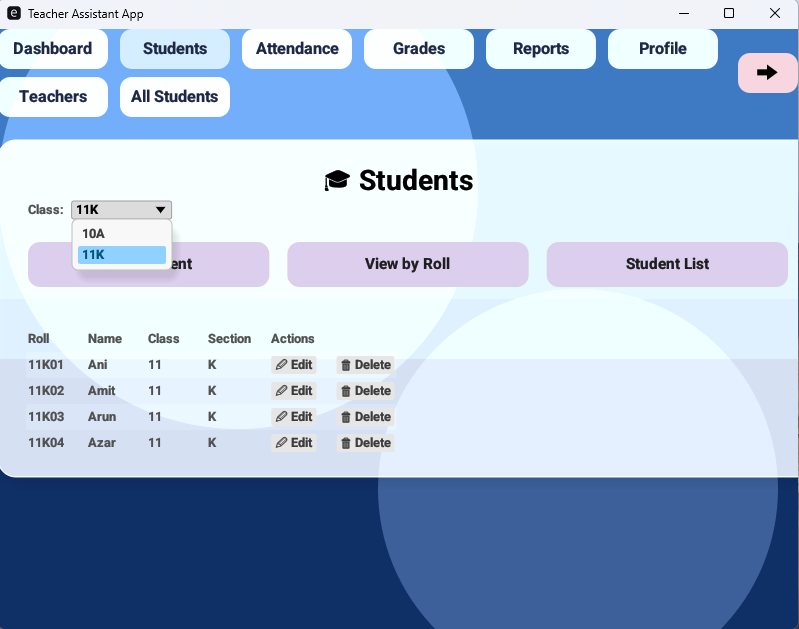
Once the teacher’s assigned classes were loaded from PostgreSQL, the interface presented a ComboBox for dynamic class selection. This ensured the displayed student records remained aligned with the selected class:
egui::ComboBox::from_id_source("class_dropdown")
    .selected_text(selected_text)
    .show_ui(ui, |ui| {

        for class in &self.classes {
            let text = format!("{}{}", class.class_name, class.section);
            if ui.selectable_label(
                Some(class.class_id) == self.selected_class_id,
                    text
            ).clicked() {
                self.selected_class_id = Some(class.class_id);
                // reload student list
                self.load_students_pending = true;
            }
        }
    });
Selecting a class triggered a database request to retrieve students associated with that class. The update loop handled this loading lifecycle, ensuring the application state remained synchronized with PostgreSQL:
if self.load_students_pending {
    self.load_students_pending = false;
        let db = self.db.clone();
        let result = pollster::block_on(async {

            if let Some(class_id) = self.selected_class_id {
                db.get_students_by_class(class_id).await
            }else{
                Ok(Vec::new())
            }
        });

        match result {
            Ok(students) => {
                self.students = students;
            }
            Err(err) => {
                println!("Error loading students: {:?}", err);
            }
        }
}
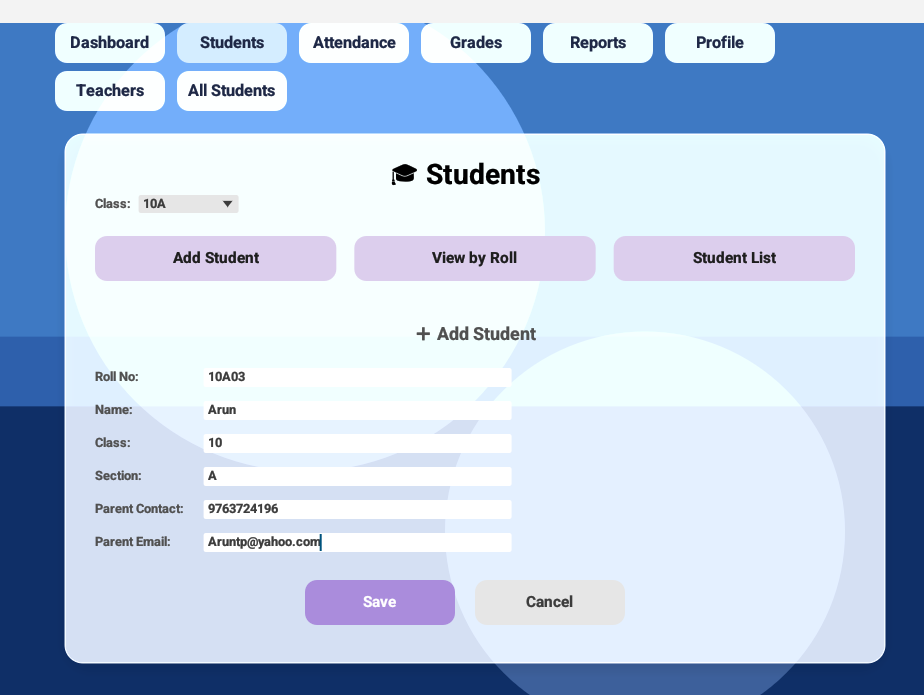
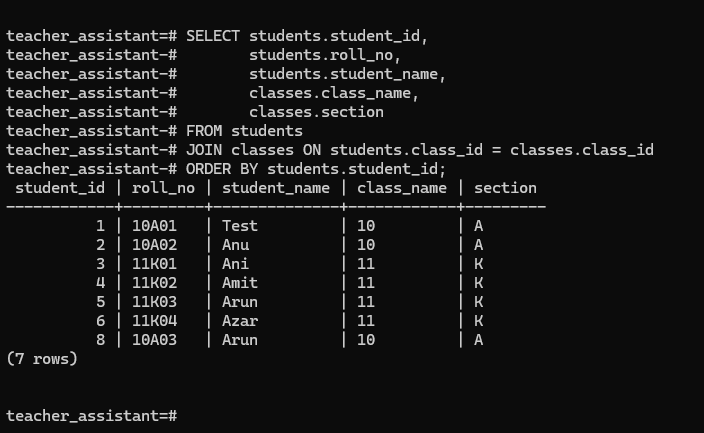
Student management operations—adding, updating, and deleting—were handled through database-backed functions, ensuring that all changes were applied to persistent storage:
pub async fn insert_student(
    &self,
    roll_no: &str,
    student_name: &str,
    class_id: i32,
    parent_contact: &str,
    parent_email: &str,
) -> Result<(), sqlx::Error>
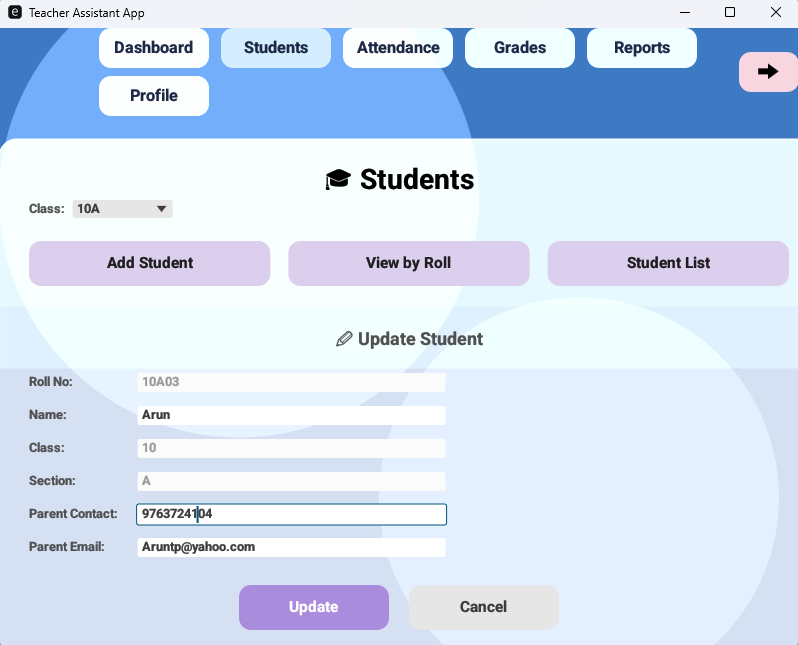
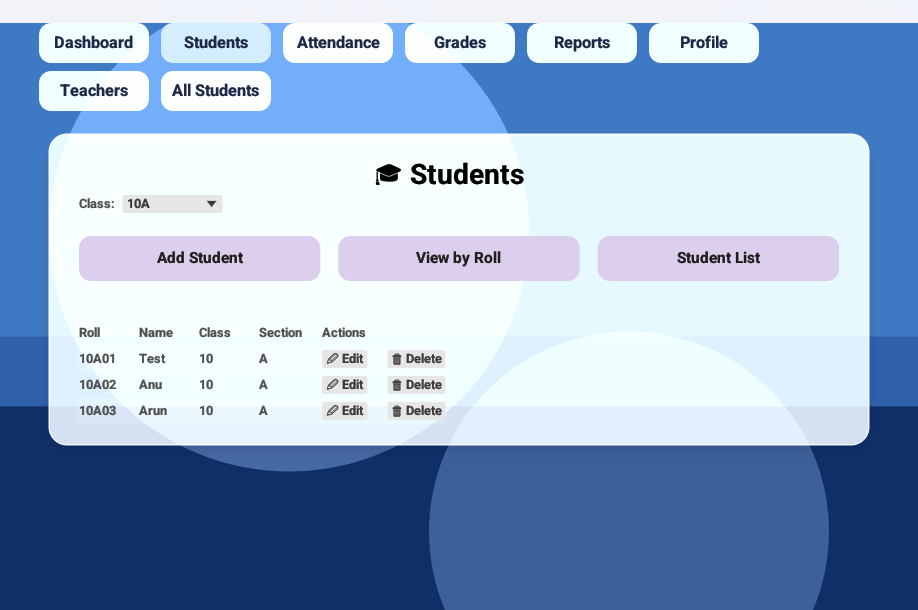
Role-based restrictions were enforced directly at the UI level using the role stored in application state. Administrators retained full editing access, while teachers were limited to permitted fields such as parent contact and email:
let is_admin = self.user_role.as_deref() == Some("admin");
    ui.label("Roll No:");
        ui.add_enabled(
            is_admin,
            egui::TextEdit::singleline(&mut self.student_roll)
                .desired_width(300.0)
                .hint_text("Enter the roll no"),
        );
        ui.end_row();

        ui.label("Name:");
            ui.add(egui::TextEdit::singleline(&mut self.student_name)
                .desired_width(300.0)
                .hint_text("Enter the name"),
            );
            ui.end_row();

        // Class and section not shown in this snippet

        ui.label("Parent Contact:");
            ui.add(egui::TextEdit::singleline(&mut self.parent_contact)
                .desired_width(300.0)
                .hint_text("Enter the contact number"),
            );
        ui.end_row();

        ui.label("Parent Email:");
            ui.add(egui::TextEdit::singleline(&mut self.parent_email)
                .desired_width(300.0)
                .hint_text("Enter the mail id"),
            );
        ui.end_row();
Deletion operations were similarly restricted to administrators, preventing unauthorized record removal:
if self.user_role.as_deref() == Some("admin") {
    if ui.button("🗑 Delete").clicked() {
        self.delete_student_pending = Some(student.student_id);
    }
}
By combining class-based filtering, role-aware permissions, and database-backed CRUD operations, the students panel became a fully state-driven interface. Class selection determined data visibility, user roles controlled permitted actions, and database operations ensured persistent consistency.
The students panel was no longer a static data view. It became a controlled interface where identity, role, and class assignment collectively defined how academic records were accessed and managed.
🖼️ Interface Overview
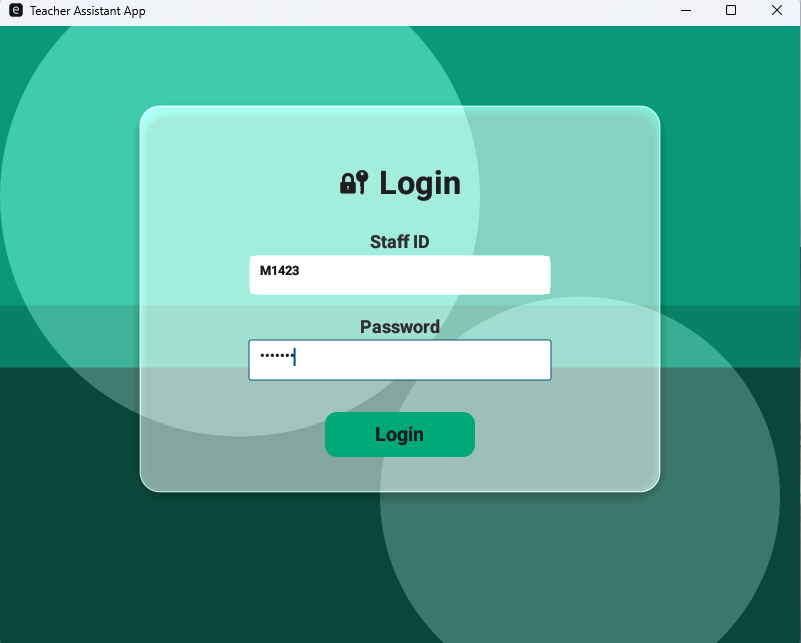
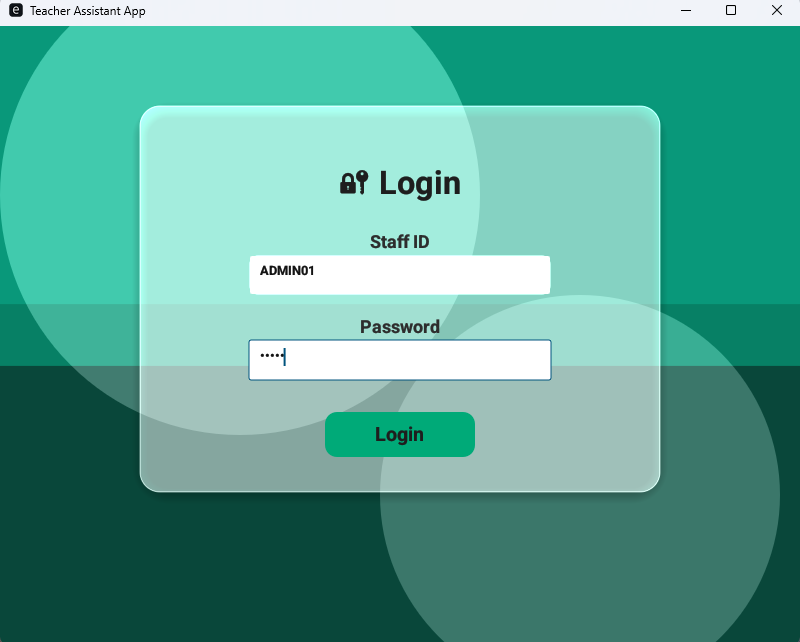
The following walkthrough illustrates how role-based state influences navigation, data visibility, and permitted actions within the interface.
Click the arrows to navigate through images.
🎬 Demo Video
Demo of Dashboard panel and Students CRUD operations
📜 Conclusion
This phase connected the dashboard and students panel directly to PostgreSQL while introducing role-based access control across the interface. Navigation, student records, and permitted actions now adapt dynamically based on the authenticated user and assigned classes.
With structured state management and database-backed operations in place, the application has moved beyond static UI into a system capable of managing real academic data reliably.
🔜 Next on Techn0tz
The next phase will focus on implementing attendance tracking, extending the existing data model to record and calculate attendance across classes while maintaining the same role-aware and state-driven architecture.
More Level 3 updates will be shared on Techn0tz🚀.