📄 Introduction
“Importing data shouldn’t be a gamble.”
Most data corruption doesn’t happen during complex operations — it happens when a user clicks Submit twice.
In the earlier SQLite integration post, the import flow was discussed as part of the overall application design. However, handling repeated imports introduces a deeper challenge that is easy to overlook.
Imagine this: a user clicks Import on a large student dataset. Midway through the process, the connection drops. Unsure of what happened, they trigger the import again.
What happens next?
Does the database quietly handle the situation, or does it end up filled with duplicate records and inconsistent data?
This is a common issue in real-world applications — operations repeated unintentionally that corrupt data consistency.
A straightforward solution might seem simple at first: check if a record exists, then decide whether to update or insert. But this quickly leads to additional queries, conditional logic, and increased complexity.
This raises an important question:
How can we insert new data while safely updating existing records — without introducing messy logic into the application?
🧱 The Traditional Approach (And Why It Gets Messy)
A common way to handle this scenario is to check whether a record already exists before deciding to update or insert.
At first glance, this approach seems reasonable.
// ❌ The "Messy" Way (Avoid this!)
let student = db::find_student(id).await;

if let Some(existing) = student {
    // Round-trip #2: Update
    db::update_grade(id, new_score).await;
} else {
    // Round-trip #2: Insert
    db::insert_student(id, name, score).await;
}
Explanation:
| Code Section | What It Does | Impact |
|---|---|---|
find_student(id) |
Checks if the record exists | Requires a separate query |
if let Some(...) |
Branches logic based on result | Adds conditional complexity |
update_grade(...) |
Updates existing record | Second database call |
insert_student(...) |
Inserts new record | Separate execution path |
💡 Techn0tz Tip: This “check-then-act” pattern is a known anti-pattern called TOCTOU (Time-of-Check to Time-of-Use).
In concurrent systems, the data you check may change before you act on it — leading to inconsistent results.
Why This Becomes a Problem
While this works for small cases, it introduces a few issues as the system grows:
- Multiple database calls → One to check, another to modify
- Increased latency → Each operation adds a round trip
- More branching logic → Harder to maintain and test
- Race conditions → Data may change between check and update
The Hidden Cost
What starts as a simple check quickly turns into tightly coupled logic between the application and the database.
Instead of focusing on what needs to be done, the code now manages how to decide what to do — increasing complexity with every operation.
This is where a different approach becomes necessary — one that shifts this responsibility from the application to the database.
🔍 Understanding UPSERT
UPSERT is a combination of two operations — Update + Insert. The term itself is a portmanteau, representing the ability to insert a new record or update an existing one when a conflict occurs.
In simple terms, UPSERT allows the database to decide what should happen:
- If the record does not exist → Insert
- If the record already exists → Update
Why UPSERT Matters
In the previous section, handling this logic required multiple steps — checking for existence, then deciding whether to update or insert.
UPSERT removes that responsibility from the application and shifts it to the database.
Instead of writing conditional logic, a single query can handle both scenarios reliably.
Prerequisites for Using UPSERT
UPSERT works only when the database can detect a conflict. This requires a UNIQUE constraint or PRIMARY KEY on one or more columns.
For example:
roll_nomust be unique- or a combination like
(class_id, roll_no)
Without this, the database has no way to determine when to update instead of insert.
💡 Quick Fact: While commonly referred to as “UPSERT,” different databases implement it with slightly different syntax.
MySQL usesON DUPLICATE KEY UPDATE, whereas PostgreSQL and SQLite use the cleanerON CONFLICTsyntax — which we’ll use in this Rust example.
How UPSERT Works
When an insert operation is executed:
- The database checks for a conflict on the defined constraint
- If no conflict → the record is inserted
- If a conflict occurs → the specified update logic is executed
This entire process happens in a single database operation, eliminating the need for multiple queries.
Where UPSERT is Useful
While commonly used during database operations, the concept of UPSERT applies to many real-world scenarios:
- Data imports → Prevent duplicate records during repeated imports
- Synchronization logic → Keep data consistent between systems
- User updates → Update profiles without checking existence manually
- Caching systems → Refresh or insert data dynamically
Key Idea
UPSERT shifts decision-making from the application layer to the database, simplifying code while improving consistency.
🧪 Building a Simple UPSERT Demo
To understand how UPSERT simplifies data handling, let’s use a small, focused example.
This demo uses an in-memory SQLite database and a simple grades table with a UNIQUE constraint on student_name. The goal is to simulate repeated inserts and observe how UPSERT handles conflicts.
Project Setup
In cargo.toml file of your project, add the dependencies given below.
[package]
name = "upsert_demo"
version = "0.1.0"
edition = "2024"

[dependencies]
sqlx = { version = "0.7", features = ["runtime-tokio-native-tls", "sqlite"] }
tokio = { version = "1", features = ["full"] }
Main.rs Code
use sqlx::{sqlite::SqlitePool, Row};

#[tokio::main]
async fn main() -> Result<(), sqlx::Error> {
    // In-memory database (resets every run)
    let pool = SqlitePool::connect("sqlite::memory:").await?;

    // Create table
    sqlx::query(
        "CREATE TABLE grades (
            id INTEGER PRIMARY KEY,
            student_name TEXT UNIQUE,
            score INTEGER
        )"
    )
    .execute(&pool)
    .await?;

    println!("🚀 UPSERT Demo Started...\n");

    // -------------------------------
    // WITHOUT UPSERT
    // -------------------------------
    println!("--- Without UPSERT ---");

    insert_grade(&pool, "Alice", 85).await?;
    println!("\nInserted Alice: 85");

    // Try duplicate insert
    let result = insert_grade(&pool, "Alice", 98).await;

    if result.is_err() {
        println!("❌ Duplicate insert failed (UNIQUE constraint)");
    }


    // -------------------------------
    // WITH UPSERT
    // -------------------------------
    println!("\n--- With UPSERT ---");

    upsert_grade(&pool, "Alice", 98).await?;
    println!("\n🔄 Upserted Alice: 98 (Existing record updated)");

    // -------------------------------
    // FINAL OUTPUT
    // -------------------------------
    let rows = sqlx::query("SELECT student_name, score FROM grades")
        .fetch_all(&pool)
        .await?;

    println!("\n📊 Final DB State:");

    for row in rows {
        println!(
            "Student: {}, Score: {}",
            row.get::<String, _>(0),
            row.get::<i64, _>(1)
        );
    }

    Ok(())
}

// Normal insert (NO UPSERT)
async fn insert_grade(
    pool: &SqlitePool,
    name: &str,
    score: i64,
) -> Result<(), sqlx::Error> {
    sqlx::query(
        "INSERT INTO grades (student_name, score) VALUES (?, ?)"
    )
    .bind(name)
    .bind(score)
    .execute(pool)
    .await?;

    Ok(())
}

// UPSERT function
async fn upsert_grade(
    pool: &SqlitePool,
    name: &str,
    score: i64,
) -> Result<(), sqlx::Error> {
    sqlx::query(
        r#"
        INSERT INTO grades (student_name, score)
        VALUES (?, ?)
        ON CONFLICT(student_name)
        DO UPDATE SET score = excluded.score
        "#
    )
    .bind(name)
    .bind(score)
    .execute(pool)
    .await?;

    Ok(())
}
Explanation:
| Code Section | What It Does | Why It Matters |
|---|---|---|
SqlitePool::connect(...) |
Creates in-memory database | Fresh state for every run |
CREATE TABLE grades |
Defines schema with UNIQUE(student_name) |
Required for conflict detection |
insert_grade() |
Executes INSERT INTO grades... |
Fails when duplicate exists |
upsert_grade() |
Executes INSERT ... ON CONFLICT DO UPDATE |
Updates existing record automatically |
Function calls in main() (insert vs upsert) |
Triggers insert or UPSERT logic | Helps compare both behaviors |
Final SELECT query |
Reads all records | Displays final database state |
Running the Demo
To observe the difference clearly, run each approach separately.
👉 Comment out one section at a time:
// -------------------------------
// WITHOUT UPSERT
// -------------------------------
/*println!("--- Without UPSERT ---"); ← (Like this)

insert_grade(&pool, "Alice", 85).await?;
println!("\nInserted Alice: 85");

// Try duplicate insert
let result = insert_grade(&pool, "Alice", 98).await;

if result.is_err() {
    println!("❌ Duplicate insert failed (UNIQUE constraint)");
}*/   ← (Like this)


// -------------------------------
// WITH UPSERT
// -------------------------------
println!("\n--- With UPSERT ---");

upsert_grade(&pool, "Alice", 98).await?;
println!("\n🔄 Upserted Alice: 98 (Existing record updated)");
What Happens During Execution
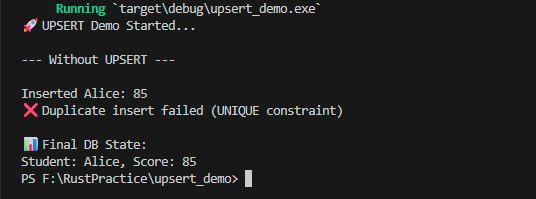
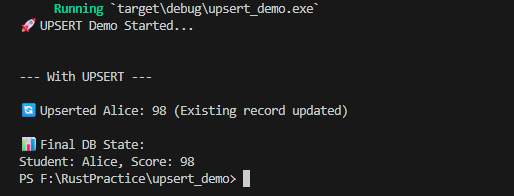
| Attempt | Student | Score | Result |
|---|---|---|---|
| #1 (Insert) | Alice | 85 | New record created ✅ |
| #2 (Insert) | Alice | 98 | Fails due to UNIQUE constraint ❌ |
| #3 (UPSERT) | Alice | 98 | Existing record updated 🔄 |
⚖️ Output Comparison
Observe the difference below:
1️⃣ Without UPSERT — Duplicate insert fails due to UNIQUE constraint
Click the image to view full size
2️⃣ With UPSERT — Existing record is updated instead of creating a duplicate
Click the image to view full size
💡 Try it yourself:
Modify the score value and run the program again.
Observe how UPSERT updates the existing record instead of creating a duplicate.
This same approach is used in the Teacher Assistant application during data import. Instead of creating duplicate entries, repeated imports update existing records — ensuring consistent data without additional logic
⚠️ Common Mistakes When Using UPSERT
- Missing UNIQUE constraint → If duplicates appear without errors, the database has no way to detect conflicts
- Wrong conflict column → Updates may not behave as expected
- Overusing UPSERT → Not suitable for all scenarios (e.g., complex merge logic)
- Ignoring database differences → Syntax varies slightly across databases
📜 Conclusion
Handling repeated operations safely is essential for maintaining data consistency in real-world applications. What appears to be a simple insert operation can quickly introduce complexity when the same action is performed multiple times.
UPSERT provides a clean and reliable solution by allowing the database to handle conflicts directly. This removes the need for conditional logic in the application and ensures that data remains consistent even under repeated operations.
Stay tuned on 🚀Techn0tz as we build further on this foundation.