📄 Introduction
A grades system becomes truly useful only when marks flow seamlessly into reports.
The previous phases of the Teacher Assistant Level 3 app — Dashboard + CRUD and Import, Export and Sync Mode — explored the dashboard panel, student CRUD operations, and Excel import workflows using UPSERT. That foundation made it possible to design a more structured grades workflow on top of the existing student and class management modules.
The implementation was designed around a simple teacher-driven process:
- Create exams and subjects
- Enter marks for each student
- Automatically calculate totals and percentages
- Prepare the data for report generation
Instead of treating marks entry as another CRUD screen, the focus was on building a scalable report generation pipeline that could later support HTML reports, PDF exports, and email delivery workflows.
This post focuses on the foundation of that system — the database structure, dynamic marks entry UI, and automatic calculation system built using Rust, egui, and PostgreSQL.
The foundation of that pipeline begins with a relational database structure capable of adapting to dynamic exams, subjects, and marks data.
🗂️ Structuring the Grades Database
The grades module follows a simple relational structure where exams contain multiple subjects and students can have marks recorded for each subject.
Instead of storing totals and percentages directly in the database, only the actual subject marks are stored. Totals and percentages are calculated dynamically during UI rendering and report generation. This keeps the schema normalized and avoids inconsistencies when marks are updated later.
The persistence layer was built around three core tables:
examssubjectsgrades
Each table handles a specific responsibility within the grading system.
Exams Table
The exams table stores the list of exams created by teachers, such as Test 1, Quarterly Exam, or Semester 1. A unique constraint prevents duplicate exam names from being created accidentally.
CREATE TABLE exams (
    exam_id SERIAL PRIMARY KEY,
    exam_name VARCHAR(50) NOT NULL UNIQUE,
    created_at TIMESTAMP DEFAULT CURRENT_TIMESTAMP
);
Subjects Table
The subjects table links subjects to a particular exam and stores the maximum marks for each subject. The composite unique constraint ensures the same subject cannot be added multiple times for a single exam.
CREATE TABLE subjects (
    subject_id SERIAL PRIMARY KEY,

    subject_name VARCHAR(50) NOT NULL,
    subject_code VARCHAR(20),

    exam_id INTEGER NOT NULL,
    max_marks INTEGER NOT NULL DEFAULT 100,

    UNIQUE(exam_id, subject_name),

    FOREIGN KEY (exam_id)
    REFERENCES exams(exam_id)
    ON DELETE CASCADE
);
Grades Table
The grades table stores marks for each student, subject, and exam combination. A composite unique constraint prevents duplicate entries while still allowing marks to be updated later using UPSERT-style workflows.
CREATE TABLE grades (
    grade_id SERIAL PRIMARY KEY,

    student_id INTEGER NOT NULL,
    subject_id INTEGER NOT NULL,
    exam_id INTEGER NOT NULL,

    marks_obtained INTEGER NOT NULL,

    created_at TIMESTAMP DEFAULT CURRENT_TIMESTAMP,

    UNIQUE(student_id, subject_id, exam_id),

    FOREIGN KEY (student_id)
    REFERENCES students(student_id)
    ON DELETE CASCADE,

    FOREIGN KEY (subject_id)
    REFERENCES subjects(subject_id)
    ON DELETE CASCADE,

    FOREIGN KEY (exam_id)
    REFERENCES exams(exam_id)
    ON DELETE CASCADE
);
Once the persistence layer was established, attention shifted toward building an interface capable of handling dynamic subjects, live calculations, and scalable marks entry.
🧱 Building the Grades Interface
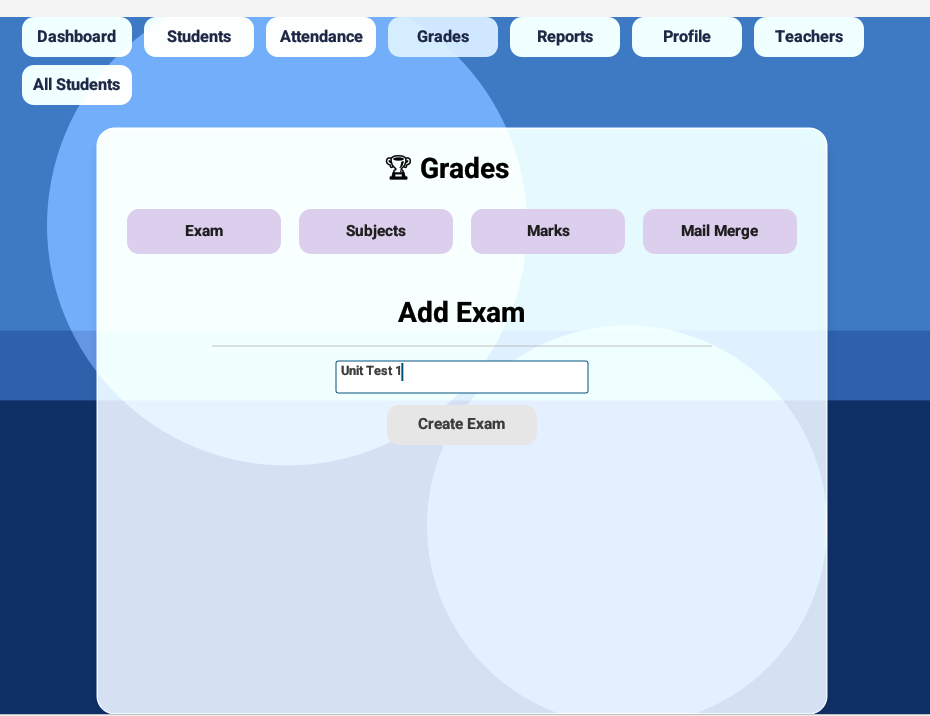
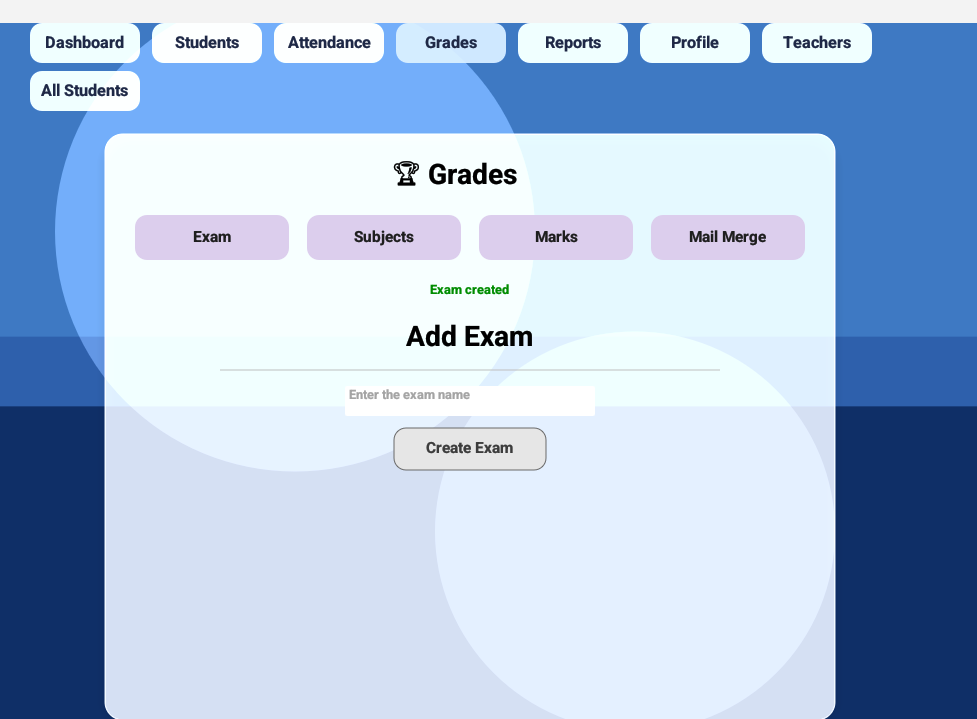
Create Exam
The grades panel begins with exam creation. Each exam acts as the parent layer for subjects, marks, and report generation features.
To keep the interaction lightweight, exam creation was handled directly inside the grades panel using state-driven handlers.
When a teacher creates an exam:
- the exam is inserted into the database
- duplicate exam names are prevented using database constraints
- the exams list is refreshed automatically
- the newly loaded exam becomes available immediately in the subjects and marks workflows
The implementation uses trigger-based handlers inside the update() loop to separate state changes from database operations.
// Create exam handler
if self.trigger_create_exam {
    println!("Trigger detected!");
    self.trigger_create_exam = false;

    let db = self.db.clone();
    let exam_name = self.exam_name.clone();

    let result = pollster::block_on(async {
        db.create_exam(&exam_name).await
    });

    match result {
        Ok(_) => {
            self.grade_success = Some("Exam created".to_string());
            self.grade_success_time = Some(std::time::Instant::now());
            self.exam_name.clear();
            self.load_exams_pending = true;
        }
        Err(e) => {
            if e.to_string().contains("unique") {
                self.grade_error = Some("Exam already exists".to_string());
            } else {
                self.grade_error = Some(format!("Create exam failed: {}", e));
            }
        }
    }
}

// Load exams handler
if self.load_exams_pending {
    self.load_exams_pending = false;

    let db = self.db.clone();

    let result = pollster::block_on(async {
        db.get_all_exams().await
    });

    match result {
        Ok(exams) => {
            self.exams = exams;
            if self.selected_exam_id == 0 && !self.exams.is_empty() {
                self.selected_exam_id = self.exams[0].exam_id;
            }
        }
        Err(err) => {
            self.student_error = Some(format!("Failed to load exams: {}", err));
        }
    }
}
Exam Handlers Breakdown:
| Code Line | Description |
|---|---|
trigger_create_exam |
Detects when the Create Exam button is clicked |
pollster::block_on() |
Executes async database operations inside the egui update loop |
create_exam() |
Inserts the exam into PostgreSQL |
| Unique constraint handling | Prevents duplicate exam names |
load_exams_pending |
Triggers automatic exam refresh after insertion |
| Auto-selection logic | Automatically selects the first available exam |
The automatic refresh flow removed the need for manual reload actions while keeping the exam, subject, and marks workflows synchronized through a single state update cycle.
Once the exam layer was established, subjects could be attached dynamically to the selected exam.
Screenshot:
Click the arrows to navigate through images.
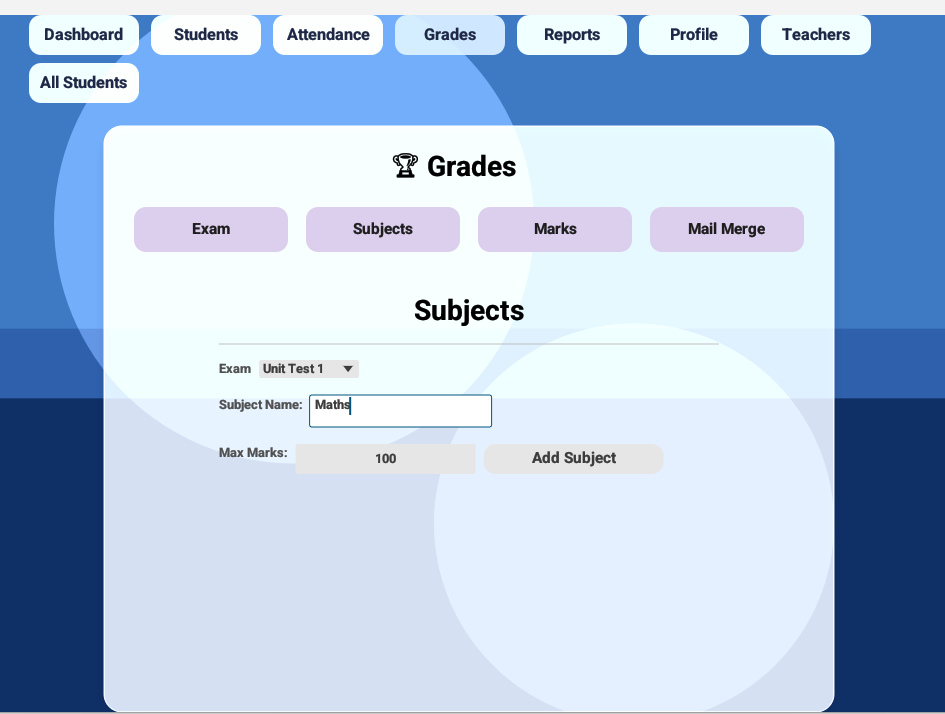
Managing Subjects
The subjects panel was designed to adapt dynamically based on the currently selected exam and the subject controls were embedded directly inside the grades panel, allowing teachers to configure subjects and enter marks without switching contexts.
Each subject is linked directly to an exam, allowing different exams to maintain independent subject configurations. This made it possible to support scenarios such as unit tests, quarterly exams, and semester exams with completely different subject structures.
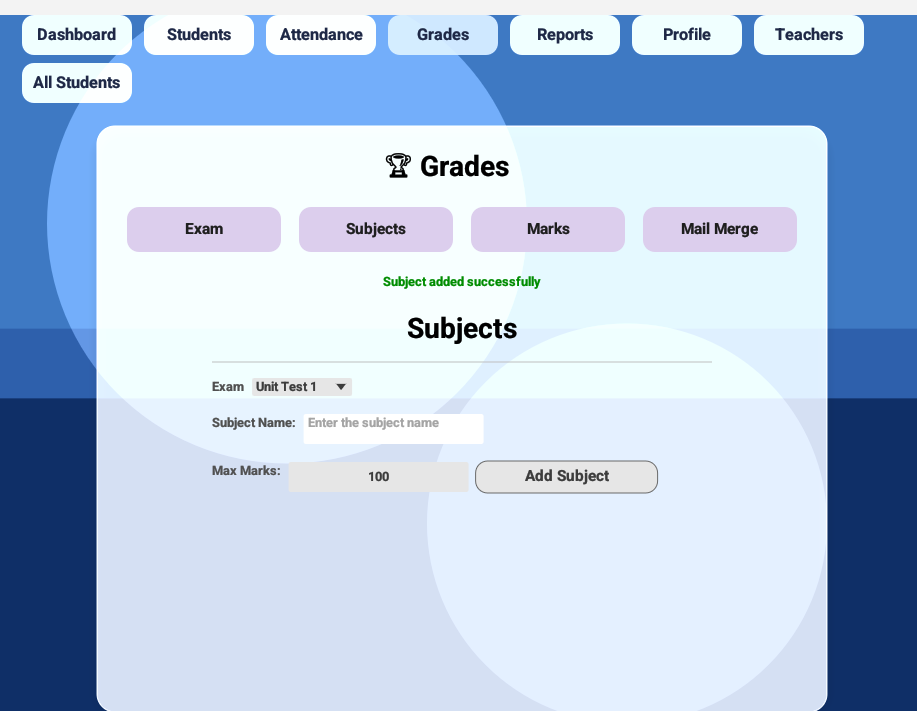
When a teacher adds a subject:
- the subject is inserted for the currently selected exam
- maximum marks are stored alongside the subject definition
- subjects are refreshed automatically after insertion
- the updated subject list becomes immediately available inside the marks entry panel
The implementation again uses trigger-based handlers inside the update() loop to separate state changes from database operations.
if self.trigger_add_subject {
    self.trigger_add_subject = false;

    let db = self.db.clone();
    let exam_id = self.selected_exam_id;
    let subject_name = self.subject_name.clone();
    let max_marks = self.max_marks;

    let result = pollster::block_on(async {
        db.add_subject(exam_id, &subject_name, max_marks).await
    });

    match result {
        Ok(_) => {
            self.grade_success = Some("Subject added successfully".to_string());
            self.grade_success_time = Some(std::time::Instant::now());
            self.subject_name.clear();
            self.load_subjects_pending = true;
        }
        Err(err) => {
            self.grade_error = Some(format!("Add subject failed: {}", err));
        }
    }
}

if self.load_subjects_pending {
    self.load_subjects_pending = false;

    let db = self.db.clone();
    let exam_id = self.selected_exam_id;

    let result = pollster::block_on(async {
        if exam_id > 0 {
            db.get_subjects_by_exam(exam_id).await
        } else {
            Ok(Vec::new())
        }
    });

    match result {
        Ok(subjects) => {
            self.subjects = subjects;
        }
        Err(err) => {
            self.grade_error = Some(format!("Failed to load subjects: {}", err));
        }
    }
}
Subjects Breakdown:
| Code Line | Description |
|---|---|
trigger_add_subject |
Detects when the Add Subject button is clicked |
selected_exam_id |
Associates subjects with the currently selected exam |
add_subject() |
Inserts the subject and maximum marks into PostgreSQL |
load_subjects_pending |
Triggers automatic subject refresh after insertion |
get_subjects_by_exam() |
Loads subjects dynamically for the selected exam |
| Empty exam handling | Prevents unnecessary database queries when no exam is selected |
Instead of hardcoding subject columns, the subjects panel was designed to load dynamically based on the currently selected exam. This later became the foundation for building a flexible marks entry grid capable of handling varying subject counts without changing the UI structure.
Because subjects were loaded dynamically, the marks panel no longer depended on fixed columns or hardcoded layouts. The interface could now adapt automatically to varying subject counts across different exams.
That flexibility later allowed the marks panel to generate columns, calculations, and validations entirely from the underlying academic data.
Screenshot:
Click the arrows to navigate through images.
📊 Designing the Dynamic Marks Grid
This section became the turning point where the application evolved from a collection of management panels into a fully interactive academic system.
Instead of relying on rigid marksheets with predefined subject columns, the marks entry interface was engineered to rebuild itself dynamically using the currently selected class and exam data. The UI was no longer fixed — it became entirely data-driven.
Selecting a different exam could instantly transform the entire grid.
A unit test with 3 subjects, a quarterly exam with 6 subjects, or a semester exam with practicals and theory papers — the interface adapted automatically without requiring any layout changes.
The interface begins with lightweight selection controls placed directly above the marks grid.
// class dropdown
ui.horizontal(|ui| {
    ui.label("Class:");
    if !self.classes.is_empty() {
    let selected_text = self.classes
        .iter()
        .find(|c| Some(c.class_id) == self.selected_class_id)
        .map(|c| format!("{} - {}", c.class_name, c.section))
        .unwrap_or("Select Class".to_string());

    egui::ComboBox::from_id_source("class_dropdown")
        .selected_text(selected_text)
        .show_ui(ui, |ui| {
            for class in &self.classes {
                let text = format!("{} - {}", class.class_name, class.section);
                if ui.selectable_label(Some(class.class_id) == self.selected_class_id,text).clicked() {
                    self.selected_class_id = Some(class.class_id);
                }
            }
        });
        } else {
            ui.label(
                egui::RichText::new("No classes yet. Add a student or import Excel to create one.")
                    .color(egui::Color32::from_gray(120))
            );
        }
});

// exam dropdown
ui.horizontal(|ui| {
    ui.label("Exam:");
    egui::ComboBox::from_label("")
        .selected_text(self.selected_exam_name())
        .show_ui(ui, |ui| {
            for exam in &self.exams {
                ui.selectable_value(&mut self.selected_exam_id, exam.exam_id, &exam.exam_name);
            }
        });
});
Instead of rendering incomplete grids or invalid inputs, the panel guides the user progressively through the required setup state.
select class → select exam → enter marks → save instantly
Once the selections change, the application automatically synchronizes the required datasets behind the scenes.
// class/exam change detection
if self.selected_class_id != self.prev_class_id || self.selected_exam_id != self.prev_exam_id{
    self.prev_class_id = self.selected_class_id;
    self.prev_exam_id = self.selected_exam_id;
    self.load_students_pending = true;
    self.load_subjects_pending = true;
    self.load_marks_pending = true;
}
This synchronization layer created a highly responsive interaction model. If the exam is changed it instantly refreshes:
- students
- subjects
- previously saved marks
- totals and percentages
without requiring a manual reload button.
To prevent broken layouts and partially rendered tables, the panel performs lightweight empty-state validation before constructing the grid.
// empty state handling
if self.subjects.is_empty() {
    ui.label("No subjects found for this exam");
    return;
}

if self.students.is_empty() {
    ui.label("No students found for this class");
    return;
}
Instead of showing empty tables or invalid inputs, the interface guides the user naturally through the required setup flow.
The real challenge, however, was building the marks grid itself.
Because subjects are loaded dynamically from PostgreSQL, the number of columns is unknown at compile time. The grid therefore generates subject columns at runtime based on the currently selected exam.
// dynamic subject columns
// marks input grid
egui::ScrollArea::both().show(ui, |ui| {
    egui::Grid::new("marks_grid")
        .striped(true)
        .min_col_width(70.0)
        .show(ui, |ui| {
            // HEADER
            ui.strong("Roll No");
            ui.strong("Name");

            for subject in &self.subjects {
                ui.strong(&subject.subject_name);
            }
            ui.strong("Total");
            ui.strong("%");
            ui.end_row();

            // ROWS
            for student in &self.students {

                ui.label(&student.roll_no);
                ui.label(&student.student_name);

                // SUBJECTS
                for subject in &self.subjects {
                    let key = (student.student_id as i64, subject.subject_id);
                    let entry = self.marks_input.entry(key).or_insert(0);

                    *entry = (*entry).clamp(0, subject.max_marks);

                    ui.add_sized([50.0, 26.0],egui::DragValue::new(entry)
                        .speed(1)
                        .clamp_range(0..=subject.max_marks));
                }

                let (total, max, percentage) =self.calculate_student_percentage(student.student_id as i64);

                ui.label(egui::RichText::new(format!("{}/{}", total, max)).strong());

                let color = if percentage < 50.0 {
                    egui::Color32::RED
                } else {
                    egui::Color32::from_rgb(60, 90, 160)
                };

                ui.label(egui::RichText::new(format!("{:.2}%", percentage))
                    .strong()
                    .color(color)
                );
                ui.end_row();
            }
        });
});
The marks grid effectively became a runtime-generated interface driven entirely by academic data.
Every subject instantly becomes:
- a new column
- a new marks input field
- part of total calculation
- part of percentage calculation
without modifying the UI code manually.
Each marks field also validates input against the configured maximum marks, preventing accidental overflow values during entry.
To improve readability, percentage values were also color-coded directly inside the grid. Students falling below the passing threshold are highlighted automatically during rendering. This small visual detail dramatically improved usability during large classroom evaluations because weak performances became immediately visible without generating reports first.
Rather than storing calculated totals inside the database, totals and percentages are computed live during rendering.
// calculate_student_percentage()
fn calculate_student_percentage(&self, student_id: i64) -> (i32, i32, f32) {
    let mut total = 0;
    let mut max = 0;

    for subject in &self.subjects {
        let key = (student_id, subject.subject_id);

        if let Some(marks) = self.marks_input.get(&key) {
            total += *marks;
             max += subject.max_marks;
        }
    }

    let percentage = if max > 0 {
        (total as f32 / max as f32) * 100.0
    } else {
        0.0
    };

    (total, max, percentage)
}
The result feels almost spreadsheet-like — percentages update immediately while marks are being typed.
Calculation Breakdown:
| Code Line | Decription |
|---|---|
marks_input |
Temporarily stores marks using (student_id, subject_id) keys |
| Dynamic subject iteration | Calculates totals using active exam subjects |
max += subject.max_marks |
Computes total possible marks dynamically |
| Division-by-zero protection | Prevents invalid percentage calculations |
| Real-time rendering | Updates totals and percentages instantly during editing |
The entire panel was wrapped inside scrollable containers so the interface could remain usable even with:
- large student batches
- many subjects
- smaller screen sizes
Despite the dynamic rendering complexity, the UI remained responsive because calculations, rendering, and persistence were separated into independent layers.
Saving marks was handled using bulk database operations.
// save marks handler
if self.trigger_save_marks {
    self.trigger_save_marks = false;
    if self.selected_exam_id == 0 || self.selected_class_id.is_none() {
        self.grade_error = Some("Select class and exam first".to_string());
        return;
    }

    let db = self.db.clone();
    let exam_id = self.selected_exam_id;
    let marks_map = self.marks_input.clone();

    let result = pollster::block_on(async {
        db.save_marks_bulk(exam_id, marks_map).await
    });

    match result {
        Ok(_) => {
            self.grade_success = Some("Marks saved successfully".to_string());
            self.grade_success_time = Some(std::time::Instant::now());

            self.load_marks_pending = true;
        }
        Err(err) => {
            self.grade_error = Some(format!("Save failed: {}", err));
        }
    }
}

// load marks handler
if self.load_marks_pending {
    self.load_marks_pending = false;

    let db = self.db.clone();
    let exam_id = self.selected_exam_id;

    let result = pollster::block_on(async {
        db.get_marks_by_exam(self.selected_class_id.unwrap(), exam_id).await
    });

    match result {
        Ok(rows) => {
            self.marks_input.clear();

            for row in rows {
                let key = (row.student_id, row.subject_id);
                self.marks_input.insert(key, row.marks_obtained);
            }
        }
        Err(err) => {
            self.grade_error = Some(format!("Load marks failed: {}", err));
        }
    }
}
Instead of inserting marks one-by-one, the application performs batched UPSERT-style operations, allowing existing marks to update seamlessly while preserving performance.
Mark Handlers Breakdown:
| Code Line | Description |
|---|---|
trigger_save_marks |
Detects Save Marks interaction |
| Validation checks | Ensures class and exam are selected before saving |
save_marks_bulk() |
Performs bulk UPSERT-style persistence |
load_marks_pending |
Reloads marks automatically after saving |
marks_input.clear() |
Prevents stale cached values during refresh |
What made this system particularly powerful was not just the database integration — it was the fact that the UI itself became fully data-driven.
The marks panel no longer depended on predefined layouts, fixed subject counts, or hardcoded calculations. Everything — columns, totals, percentages, validations, and highlights — adapted dynamically from the underlying academic data.
That flexibility later became the foundation for generating automated reports, printable marksheets, and future export systems without redesigning the interface again.
Screenshot:
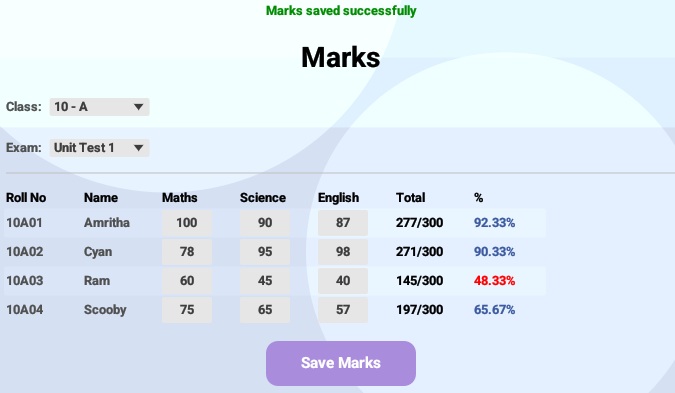
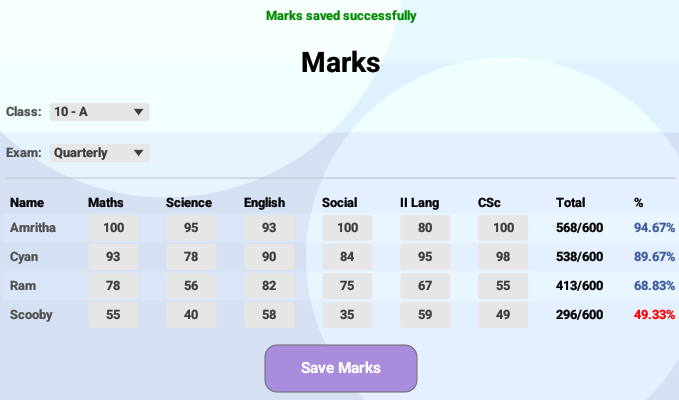
Click the arrows to compare different exam layouts.
The marks interface rebuilds itself dynamically based on the selected exam, allowing different subject structures without modifying the underlying UI layout.
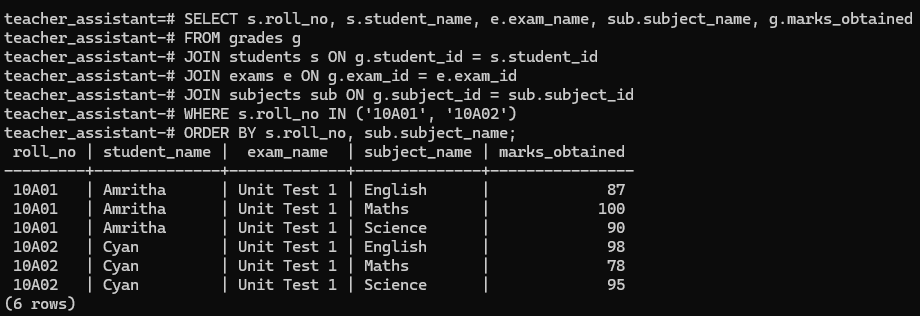
The marks entered through the dynamic interface are persisted directly into PostgreSQL using bulk UPSERT-style operations.
For demonstration purposes, the following query output shows marks stored for two students across multiple subjects and exams.
Screenshot:
Click the image to view full size
The query output demonstrates how marks remain normalized across students, exams, and subjects while still supporting dynamic calculations and report generation workflows.
🎥 Live Demo
📝 Implementation Notes
- Database queries were grouped to reduce unnecessary refresh operations during marks entry.
- Validation checks were added before persistence to prevent incomplete or invalid records from being stored.
- Separate helper functions were used for calculations, database access, and UI actions to keep the codebase easier to maintain.
- Horizontal scrolling was introduced to handle larger subject sets without compressing the grid layout.
- Batch save operations were used to update multiple student records efficiently in a single workflow.
📜 Conclusion
What began as a simple marks entry module gradually expanded into the core of a scalable academic reporting system.
As the application evolved, the focus shifted from basic data storage to building a flexible grading system capable of adapting across different exams, classrooms, and reporting requirements without redesigning the interface each time.
Marks, totals, percentages, validations, and academic summaries are now derived directly from the underlying dataset, allowing the same infrastructure to support report previews, printable marksheets, PDF exports, and future automation features with minimal additional logic.
With the grading foundation now in place, the next phase moves toward generated academic reports, export pipelines, and an upcoming mail merge system for automated student communication using Rust.
For more updates stay tuned on Techn0tz